
An accounts receivable aging report is a financial management tool that categorises outstanding customer invoices according to how long they have remained unpaid beyond their due dates. It helps businesses identify overdue balances, assess collection priorities, monitor credit risk and improve cash flow management.
For UAE businesses that offer credit terms to customers, regularly reviewing an aging report can help identify payment delays before they develop into serious collection problems.
This guide explains how to calculate, prepare and analyse an accounts receivable aging report, with a practical example in AED, Excel formulas and a free downloadable template.
What Is an Accounts Receivable Aging Report?
An accounts receivable aging report, also known as an AR aging report, is a financial report that groups outstanding customer balances into time-based categories according to their payment due dates and overdue status. It provides a snapshot of unpaid receivables as of a specific reporting date.
Accounts receivable aging, also written as accounts receivable ageing, helps businesses distinguish between invoices that are not yet overdue and those that require collection attention.
A typical receivables aging report includes current balances and invoices overdue by 1–30, 31–60, 61–90 and more than 90 days.
The report may also be referred to as a debtor aging report, customer aging report or aged debt report, depending on how the information is presented.
Unlike an accounts payable aging report, which tracks amounts a business owes to its suppliers, an accounts receivable aging report tracks amounts owed to the business by its customers.
Why Is an Accounts Receivable Aging Report Important?
An accounts receivable aging report is important because it helps businesses understand when outstanding payments are expected, identify customers with overdue balances and prioritise collection activities. It also supports cash flow forecasting, credit-risk assessment and more informed financial decisions.
The main benefits of maintaining an accurate aging report include:
- Improved cash flow visibility: Understand how much money is outstanding and identify payments that may be delayed.
- Early identification of overdue accounts: Detect late payments before outstanding balances accumulate.
- Better collection prioritisation: Allocate collection resources according to debt value, overdue status and customer circumstances.
- Customer credit-risk assessment: Identify customers with repeated payment delays and review their credit arrangements.
- More reliable financial reporting: Support receivables reconciliation and credit-loss assessments.
- Stronger collection performance monitoring: Compare aging reports over time to identify improvements or deterioration in payment behaviour.
By integrating aging reports into their accounts receivable collections process, businesses can move from reactive payment follow-ups towards a more structured approach to managing outstanding customer balances.

What Does an Accounts Receivable Aging Report Include?
An accounts receivable aging report typically includes customer details, invoice references, invoice and due dates, original invoice amounts, payments received, applicable credit notes, outstanding balances and the corresponding aging categories.
The report may also include collection notes, disputed invoice information and payment commitments to support operational follow-up.
| Report Component | Description |
|---|---|
| Customer name | Identifies the customer or debtor responsible for payment. |
| Invoice number | Provides a unique reference for each invoice. |
| Invoice date | Indicates when the invoice was issued. |
| Due date | Identifies the agreed payment deadline. |
| Invoice amount | Shows the original invoice value. |
| Payments received | Records payments applied to the invoice by the reporting date. |
| Credit notes | Records applicable credits or adjustments. |
| Outstanding balance | Shows the remaining unpaid amount. |
| Days overdue | Measures the number of days past the payment due date. |
| Aging bucket | Classifies the outstanding balance according to its overdue status. |
| Collection status | Records disputes, payment commitments or follow-up activities. |
An invoice aging report provides detailed information about individual invoices, while a customer aging report consolidates outstanding invoices into customer-level balances.
Using both views allows finance teams to identify high-risk accounts while retaining the transaction-level information needed for payment follow-up.
Accounts Receivable Aging Buckets
Accounts receivable aging buckets are time-based categories used to classify unpaid invoices according to the number of days they are overdue. A common aging schedule includes current receivables, 1–30 days, 31–60 days, 61–90 days and more than 90 days overdue.
| Aging Bucket | Meaning | Suggested Collection Priority |
|---|---|---|
| Current | Payment is not yet overdue. | Routine monitoring |
| 1–30 days | Payment is between 1 and 30 days overdue. | Initial follow-up |
| 31–60 days | Payment is between 31 and 60 days overdue. | Active follow-up |
| 61–90 days | Payment is between 61 and 90 days overdue. | Increased attention |
| 90+ days | Payment is more than 90 days overdue. | Detailed recovery assessment |
These intervals are commonly used management categories rather than mandatory legal deadlines.
Businesses may customise their aging buckets according to contractual payment terms, customer profiles, reporting requirements and internal credit policies.
An invoice falling within an older aging category may require closer attention, but its age alone does not establish whether the debt is recoverable.
How to Calculate Accounts Receivable Aging
To calculate accounts receivable aging, determine the outstanding balance of each invoice, calculate the number of days between its due date and the reporting date, and assign the remaining balance to the appropriate aging bucket.
Invoices that have not passed their due dates are classified as current.
The calculation involves three main steps.
Step 1: Calculate the outstanding invoice balance
Outstanding Balance = Original Invoice Amount − Applied Payments − Applied Credit Notes
Only payments and credits applicable as of the reporting date should be included.
Step 2: Calculate the number of overdue days
Days Overdue = Reporting Date − Invoice Due Date
If the result is negative or zero, the invoice is classified as current for overdue-aging purposes.
Step 3: Assign the outstanding balance to an aging bucket
Classify the remaining unpaid amount according to the calculated number of overdue days.
Calculation Example
Consider a UAE business that issued an invoice for AED 20,000 and subsequently received a partial payment of AED 5,000.
| Invoice Information | Value |
|---|---|
| Invoice date | 1 September 2026 |
| Payment due date | 30 September 2026 |
| Reporting date | 31 October 2026 |
| Original invoice amount | AED 20,000 |
| Payment received | AED 5,000 |
| Applied credit notes | AED 0 |
| Outstanding balance | AED 15,000 |
| Days overdue | 31 days |
| Aging bucket | 31–60 days |
The calculation is:
Outstanding Balance = AED 20,000 − AED 5,000 = AED 15,000
Days Overdue = 31 October 2026 − 30 September 2026 = 31 days
The remaining AED 15,000 is therefore assigned to the 31–60 days overdue category.
Invoice age vs. days overdue: Although an invoice may have been issued several weeks earlier, its overdue status should be measured from the agreed payment due date when the objective is to monitor late payments. Using the invoice date instead may incorrectly classify customers who are still within their agreed credit terms.
Accounts Receivable Aging Report Example
An accounts receivable aging report example demonstrates how outstanding customer balances are distributed across different aging categories. Reviewing these balances helps finance teams identify how much money is overdue, which customers require attention and where collection efforts should be concentrated.
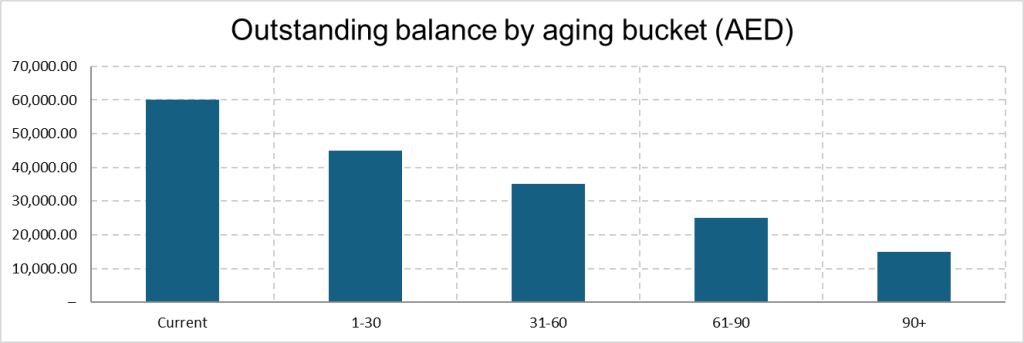
The following example represents a fictional UAE business with total outstanding receivables of AED 180,000 as of 31 October 2026.
Accounts Receivable Aging Schedule — AED
| Customer | Current | 1–30 Days | 31–60 Days | 61–90 Days | 90+ Days | Total |
|---|---|---|---|---|---|---|
| Customer A | 25,000 | 15,000 | 0 | 0 | 0 | 40,000 |
| Customer B | 20,000 | 0 | 20,000 | 10,000 | 0 | 50,000 |
| Customer C | 0 | 20,000 | 15,000 | 0 | 5,000 | 40,000 |
| Customer D | 15,000 | 10,000 | 0 | 15,000 | 10,000 | 50,000 |
| Total | 60,000 | 45,000 | 35,000 | 25,000 | 15,000 | 180,000 |
The report provides the following financial overview:
| Key Indicator | Amount |
|---|---|
| Total outstanding receivables | AED 180,000 |
| Current receivables | AED 60,000 |
| Total overdue receivables | AED 120,000 |
| Receivables overdue by more than 60 days | AED 40,000 |
| Receivables overdue by more than 90 days | AED 15,000 |
| Overdue percentage | 66.7% |
The overdue percentage can be calculated using the following formula:
Overdue Percentage = (Total Overdue Receivables ÷ Total Outstanding Receivables) × 100
For this example:
(AED 120,000 ÷ AED 180,000) × 100 = 66.7%
The report indicates that approximately two-thirds of the company’s outstanding receivables are overdue. It also identifies AED 40,000 in balances overdue by more than 60 days, which may require more intensive collection activity.
This accounts receivable aging report sample illustrates why monitoring the total outstanding balance alone is not sufficient. Understanding the age and distribution of receivables provides more useful information for collection planning.
How to Create an Accounts Receivable Aging Report in Excel
To create an accounts receivable aging report in Excel, organise your invoice data, establish a reporting date, calculate outstanding balances and overdue days, assign each invoice to an aging category and summarise the results by customer.
Excel can be particularly useful for businesses that need a flexible way to monitor receivables without implementing a dedicated collection management system.
Follow these steps to prepare your report:
- Export outstanding invoice data. Collect customer names, invoice references, invoice dates, due dates and original invoice amounts from your accounting records.
- Reconcile payments and credit notes. Confirm that the remaining invoice balances reflect transactions applied up to the reporting date.
- Set the reporting date. Use a fixed date so all invoices are assessed consistently.
- Calculate outstanding balances. Deduct applied payments and credits from each invoice amount.
- Calculate overdue days. Compare the reporting date against each invoice’s due date.
- Assign aging buckets. Classify positive outstanding balances into the relevant overdue categories.
- Create a customer-level summary. Aggregate the balances within each aging bucket for individual customers.
- Review and reconcile the report. Compare the results with your accounting records and investigate missing information, unusual balances and discrepancies.
Once the report is complete, update it regularly and record collection actions separately to monitor progress.
Accounts Receivable Aging Formula in Excel
An accounts receivable aging report in Excel can be automated using formulas that calculate outstanding balances, determine overdue days and classify invoices into aging buckets.
The following cell references correspond to the invoice register layout used in our downloadable template.
| Cell Reference | Information |
|---|---|
| B2 | Reporting date |
| A5 | Customer name |
| B5 | Invoice reference |
| C5 | Invoice date |
| D5 | Original invoice amount |
| E5 | Payment due date |
| F5 | Applied payments |
| G5 | Applied credit notes |
| H5 | Outstanding balance |
| I5 | Days overdue |
| J5 | Aging bucket |
1. Outstanding Balance Formula
=D5-SUM(F5:G5)
This formula subtracts applied payments and credit notes from the original invoice amount.
2. Days Overdue Formula
=IF(OR(H5=””,H5<=0),””,MAX(0,$B$2-E5))
This formula calculates overdue days for positive outstanding balances. It returns a blank result for settled invoices and non-positive balances.
The absolute reference $B$2 ensures that the reporting date remains fixed when the formula is copied to subsequent rows.
3. Aging Bucket Formula
=IF(I5=””,””,IF(I5=0,”Current”,IF(I5<=30,”1-30″,IF(I5<=60,”31-60″,IF(I5<=90,”61-90″,”90+”)))))
This formula automatically assigns outstanding invoices to the appropriate aging category.
4. Total Balance by Aging Bucket
=SUMIF(J5:J204,”31-60″,H5:H204)
This formula calculates the total outstanding balance assigned to the 31–60 days category.
5. Customer-Level Aging Summary
=SUMIFS($H$5:$H$204,$A$5:$A$204,”Customer A”,$J$5:$J$204,”1-30″)
This formula calculates the total balance owed by Customer A within the 1–30 days overdue category.
These formulas illustrate the core calculation logic. The downloadable workbook includes additional checks to identify incomplete invoice records, exclude invoices issued after the reporting date and flag negative or settled balances separately.
Free Accounts Receivable Aging Report Excel Template
Our free accounts receivable aging report Excel template helps UAE businesses organise unpaid invoices, calculate overdue balances automatically and identify accounts requiring collection attention.
The workbook includes five dedicated worksheets:
| Worksheet | Purpose |
|---|---|
| Instructions | Provides guidance on setting up and using the workbook. |
| Invoice Register | Records invoice details, payments, credit notes and automatically calculated aging categories. |
| Aging Summary | Consolidates outstanding balances by customer and aging bucket. |
| Dashboard | Displays total receivables, overdue balances, overdue percentages and a visual aging breakdown. |
| Collection Tracker | Records collection priorities, responsible team members, follow-up actions and payment commitments. |
The template includes the AED 180,000 example presented in this guide, allowing you to see how the calculations and dashboard work before entering your own data.
How to use the Excel template:
- Open the workbook and review the Instructions worksheet.
- Enter the required reporting date in the Invoice Register.
- Replace the fictional example invoices with your own invoice data.
- Enter payments and credit notes applied by the reporting date.
- Enter each unique customer name in the Aging Summary worksheet.
- Review the automatically calculated balances and dashboard indicators.
- Use the Collection Tracker to record follow-up actions and payment commitments.
The workbook is designed for AED-denominated reporting and includes preconfigured formulas for up to 200 invoice rows.
Negative customer balances and incomplete records should be investigated and reconciled before using the report for financial or collection decisions.
The template is provided for general financial management and collection planning. It is not a substitute for professional accounting advice, a formal impairment assessment or a complete accounting system.
How to Read and Analyse an Accounts Receivable Aging Report
Accounts receivable aging analysis involves reviewing the amount, overdue status and distribution of outstanding customer balances to identify collection risks and determine where action is required. A useful analysis considers customer payment history, invoice disputes, credit exposure and changes between reporting periods.
Using the previous example, the following areas require particular attention.
1. Assess the overdue percentage
The business has AED 120,000 in overdue receivables, representing 66.7% of total outstanding balances.
This indicates that a substantial proportion of receivables has passed its agreed payment deadline. Management should investigate the reasons for delayed collections and assess their effect on expected cash inflows.
2. Identify older outstanding balances
The business has AED 40,000 overdue by more than 60 days, including AED 15,000 overdue by more than 90 days.
These accounts may require closer investigation, particularly where customers have repeatedly missed payment commitments or stopped responding to reminders.
3. Review customer concentration
Customers B and D each owe AED 50,000. Together, they account for AED 100,000, or approximately 55.6% of total outstanding receivables.
A significant concentration of outstanding balances among a small number of customers can increase financial exposure if those customers experience payment difficulties.
4. Identify high-priority collection accounts
Customer D has AED 35,000 in overdue balances, including AED 25,000 overdue by more than 60 days.
Customer C has AED 40,000 outstanding, all of which is overdue.
Both accounts warrant attention, although the appropriate collection priority should also reflect payment history, disputes, available documentation and the customer’s financial circumstances.
5. Compare reports over time
Compare current aging results with previous reporting periods to determine whether overdue balances are decreasing or moving into older aging categories.
A growing balance within the 61–90 or 90+ days categories may indicate persistent collection difficulties, unresolved disputes or weaknesses in credit control.
6. Consider expected credit losses
Where IFRS 9 applies, aging information may support an assessment of expected credit losses on trade receivables.
A provision matrix can use aging categories together with relevant historical loss experience, current conditions and reasonable forecasts to estimate credit losses.
However, an aging report does not independently determine the appropriate impairment allowance. Businesses should avoid applying arbitrary loss percentages solely according to invoice age.
For applicable trade receivables under the IFRS 9 simplified approach, expected credit losses are measured on a lifetime basis.
Accounts Receivable Aging vs. DSO
An accounts receivable aging report shows which invoices and customer balances are outstanding and how long they have been overdue. Days Sales Outstanding (DSO), by comparison, estimates the average time a business takes to convert credit sales into cash.
Both tools provide useful but different insights into collection performance.
| Comparison | Accounts Receivable Aging Report | DSO |
|---|---|---|
| Primary purpose | Identify outstanding and overdue balances. | Measure overall collection speed. |
| Measurement | Monetary amounts grouped by overdue category. | Number of days. |
| Level of detail | Individual invoices and customer accounts. | Overall receivables performance. |
| Main application | Collection prioritisation and risk assessment. | Monitoring collection efficiency. |
| Key limitation | Represents balances at a specific reporting date. | May conceal individual long-overdue accounts. |
A business may have a relatively stable DSO while still carrying substantial overdue balances from individual customers.
Using both reports together provides a more complete understanding of accounts receivable performance.
You can use our DSO calculator alongside your aging report to monitor collection efficiency and identify areas requiring further investigation.

How to Use an Aging Report to Recover Overdue Payments
An aging report can help businesses recover overdue payments by identifying which accounts require reminders, reconciliation, payment negotiations or professional debt recovery assistance. The report should be used alongside customer payment history, debt value, contractual terms and the available supporting documentation.
The following collection action plan provides a practical starting point.
| Aging Bucket | Recommended Collection Action |
|---|---|
| Current | Confirm invoice receipt, verify payment details and monitor the upcoming due date. |
| 1–30 days overdue | Send a professional payment reminder and confirm the reason for the delay. |
| 31–60 days overdue | Contact the responsible finance representative, resolve discrepancies and request a specific payment commitment. |
| 61–90 days overdue | Review outstanding disputes, involve appropriate management and assess available escalation options. |
| 90+ days overdue | Review recoverability, supporting evidence and the suitability of professional debt recovery assistance. |
These collection stages are suggested management practices, not mandatory legal waiting periods. A significant or high-risk debt may require earlier intervention.
For each overdue account, businesses should establish:
- The confirmed outstanding amount.
- The reason for non-payment.
- The responsible customer contact.
- The most recent collection activity.
- The agreed or proposed payment date.
- The next action and person responsible for follow-up.
Applying practical debt collection tips can help finance teams maintain consistent communication and improve their approach to outstanding accounts.
Where routine reminders and payment discussions are unsuccessful, businesses should review the available unpaid invoice recovery options and ensure that the relevant contracts, invoices and correspondence are properly documented.
Common Accounts Receivable Aging Report Mistakes
An inaccurate aging report can lead to incorrect collection priorities, misleading cash flow forecasts and unreliable assessments of outstanding receivables. Businesses should regularly review the underlying invoice data and reconcile the report with their accounting records.
The following mistakes are particularly important to avoid.
| Common Mistake | How to Avoid It |
|---|---|
| Using invoice dates instead of due dates | Calculate days overdue from the applicable payment due date. |
| Using an inconsistent reporting date | Apply the same as-of date to all invoice balances and calculations. |
| Ignoring partial payments | Calculate aging using the remaining unpaid balance. |
| Overlooking credit notes | Deduct applicable credits and reconcile unapplied amounts separately. |
| Including fully settled invoices | Exclude invoices with no remaining outstanding balance. |
| Including transactions after the reporting date | Ensure all balances reflect the selected reporting period. |
| Duplicating invoice records | Use unique invoice references and review duplicate entries. |
| Ignoring disputed invoices | Record disputes and investigate their causes before escalation. |
| Treating older balances as automatically irrecoverable | Assess the customer’s circumstances and applicable accounting requirements. |
| Failing to reconcile the report | Compare the aging report with receivables ledger balances and investigate differences. |
Businesses should also avoid treating an aging report as a complete collection strategy. Accurate reporting must be followed by assigned responsibilities, timely customer communication and documented recovery decisions.
How Quick Action Can Help Recover Your Overdue Receivables
An accounts receivable aging report can identify overdue balances, but recovering those amounts often requires structured follow-up, reliable documentation and professional communication with debtors.
Quick Action assists UAE businesses with assessing outstanding commercial debts, reviewing supporting records, identifying appropriate collection priorities and pursuing amicable recovery solutions. Where further escalation is necessary, the available recovery options can be assessed according to the circumstances of the debt.
Whether your aging report identifies a small number of long-overdue invoices or a substantial portfolio of outstanding customer balances, our corporate debt collection and recovery services can help you determine an appropriate next step.
Get Help Recovering Overdue Receivables
Frequently Asked Questions
How often should an accounts receivable aging report be prepared?
An accounts receivable aging report should be prepared regularly according to the business’s invoice volume, credit exposure and collection requirements.
Weekly reviews can help finance teams monitor payment delays and prioritise collection activity, while monthly reports can support financial reporting and management reviews.
Businesses with significant overdue balances or high-risk customer accounts may benefit from more frequent monitoring.
Are receivables over 90 days considered bad debt?
No. Receivables overdue by more than 90 days are not automatically considered irrecoverable or required to be written off.
Older balances may indicate an increased collection risk, but recoverability depends on factors such as customer circumstances, payment history, disputes, available evidence and applicable accounting requirements.
Where IFRS 9 applies, businesses should assess expected credit losses using the relevant accounting requirements rather than relying exclusively on invoice age.
An accounting write-off also does not, by itself, establish that the underlying legal right to pursue a debt has been extinguished.
What does a negative balance mean in an accounts receivable aging report?
A negative balance in an accounts receivable aging report may indicate a customer overpayment, an unapplied receipt, a credit note exceeding the outstanding invoice amount or an accounting error.
Negative balances should be investigated and reconciled before being treated as collectible receivables.
Businesses should also determine whether the amount represents an available customer credit, an obligation to refund the customer or an amount requiring reallocation within their accounting records.
Can small businesses use an accounts receivable aging report in Excel?
Yes. Excel can be a practical solution for small businesses with manageable invoice volumes and straightforward customer accounts.
An accounts receivable aging report Excel template can automate overdue calculations, organise customer balances and support collection planning without requiring specialised software.
However, businesses managing large receivables portfolios, multiple currencies or complex transaction histories may benefit from integrated accounting and collection management systems.
Sources & References
- IFRS Foundation — IFRS 9 Financial Instruments.
- IFRS Foundation — Post-implementation Review of IFRS 9: Impairment.
- Australian Accounting Standards Board — AASB 9 Financial Instruments, supporting reference for financial instrument impairment and provision matrix principles.